
Chapter 11 Embedding Shiny Apps
This chapter covers integrating Shiny applications into your existing website or web application to enable consistent user experience.
Once you have deployed your Shiny application, you may not want to directly share the link. Instead, you already have an existing website and you would like your Shiny application to appear seamlessly within your existing website. This also means that if you host your Shiny app on a different platform with a unique URL, you can embed the Shiny app hosted elsewhere into your own website, ensuring it remains accessible under a branded, consistent web address.
Iframes are useful when your Shiny app functions as a dashboard or informational widget that doesn’t resemble a full application but still requires branding and navigation to other pages with a header. They are also useful when you would like to load an informational Shiny app for a blog post. Your application can be Shinylive or Shiny hosted anywhere – what matters is that the app has a web address that is public and accessible.
This chapter will go through using iframes (inline frame) which is an HTML element that allows embedding another website into the current webpage.
11.1 Understanding Iframes
An inline frame (iframe) is an HTML (HyperText Markup Language) element that embeds another website into a website page. The iframe code is to be expected to embedded into the HTML of your website. If you are using a platform like WordPress, you would use an HTML widget to embed an iframe. To use an iframe in HTML, the code would be as follows:
<iframe
  title="Faithful R Shiny App"
  style="border: none;"
  frameborder="0"
  src="https://h10y.shinyapps.io/faithful-r/"
></iframe>
The src attribute specifies the website you would like to embed.
The title attribute specifies the title of your iframe element and is
used by screen readers to describe the contents of the embedded website.
The frameborder attribute, recognized only by older browsers,
specifies if there should be a border or not.
The style attribute is used to specify CSS (cascading style sheet)
styling rules for the iframe tag.
Here we specify border: none; to ensure that no border is present
when embedding a website if the frameborder attribute
is not recognized by the browser.
11.2 Styling Iframes
In the previous section briefly mentioned how to style the border of an iframe. There are several other options to make your iframe more responsive and reduce the performance impact of loading iframes.
To make the iframe more responsive, filling the
browser window as needed, you can set the
height attribute to 80vh and width attribute
to 100%. 80vh stands for 80% of the viewport height.
The vh unit is relative to the height of the
browser window (viewport). To fill your iframe to be 100% of
the window height you would set it to 100vh. The 100%
of width means that it will take up 100% of the width of
its parent container.
Furthermore, you might also not want the iframe to load the
embedded webpage until the web browser has the iframe in
view. Hence, you can also set the loading attribute to
be lazy. By default the attribute is eager.
These are how the rules are defined in an iframe:
<iframe
  title="Faithful R Shiny App"
  style="border: none;"
  frameborder="0"
  width="100%"
  height="80vh"
  loading="lazy"
  src="https://h10y.shinyapps.io/faithful-r/"
></iframe>
The following example shows a simple HTML page to give you an idea for how to embed the Shiny app, for example, as part of a blog post or and educational material where you need a micro-app to demonstrate something in an interactive fashion (11.1):
<!DOCTYPE html>
<head>
</head>
<body>
  <!-- HTML content -->
  <iframe
    title="Faithful Python Shiny App"
    style="width:80%; height:500px; loading:lazy"
    frameborder="1"
    src="https://h10y.shinyapps.io/faithful-py/"
  >
    Your browser doesn't support iframes
  </iframe>
</body>
</html>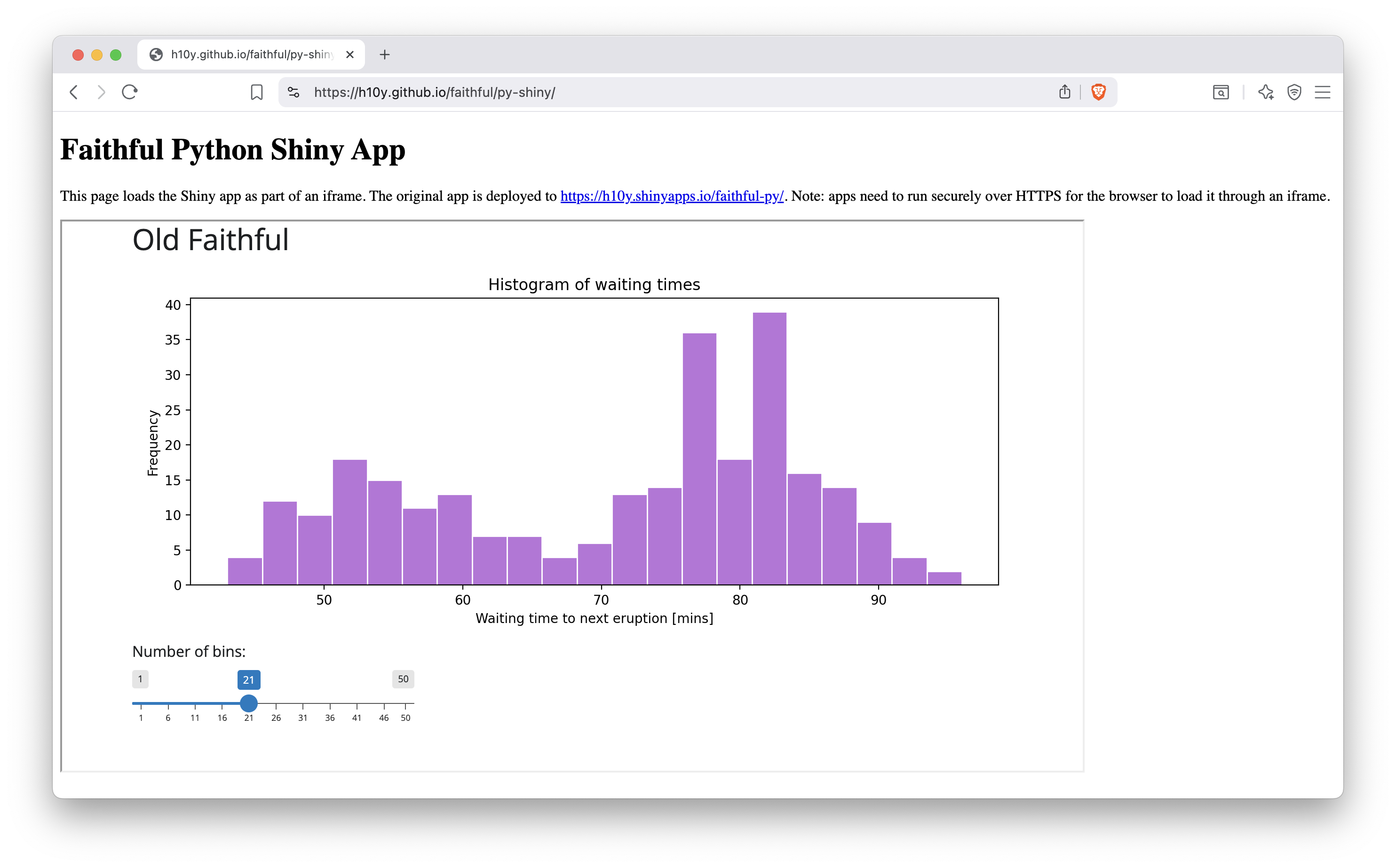
Figure 11.1: A Python Shiny app embedded into a static HTML page hosted by GitHub pages.
Most blogging platforms, like Wordpress or Ghost, support adding HTML snippets that can contain iframes too. In that case, only include the iframe part, not the full HTML page.
You might notice that we used the style to list more than one attribute
for the iframe. This is equivalent to listing them as key-value pairs.
The text between the opening <iframe> and the closing </iframe> tags
shows up in browsers that do not support iframes.
The next HTML example is useful when you want the full window to be taken up by the embedded app, so that the embedding HTML’s URL is shown instead of the embedded URL source:
<!DOCTYPE html>
<head>
</head>
<body>
  <iframe
    title="Faithful R Shiny App"
    style="position:fixed; width:100%; height:100%; border:none;"
    src="https://h10y.shinyapps.io/faithful-r/"
  >
    Your browser doesn't support iframes
  </iframe>
</body>
</html>
This full-page view is ideal when using a custom domain for your static HTML pages that embed Shiny apps from shinyapps.io where custom domains do not support HTTPS. The full-page iframe is also ideal when hosting apps on different hosting platforms under the free tiers (or using multiple user accounts on a particular platform for free). In this case, the app URLs might have different domains. Using iframes will provide with custom domain name and customizable URL paths for many different Shiny and other applications.
You can use static hosting options outlined for Shinylive applications
(Chapter 10) or host the HTML pages on your own
file server (Chapter 12).
Take a look at the GitHub Pages setup of the Faithful example
(https://github.com/h10y/faithful).
The docs/r-shiny/index.html and docs/py-shiny/index.html files
contain more elaborate versions of the above two examples.
These HTML pages also use a CSS-based loader.
Such loaders can be helpful when the cold start time of the embedded app is
relatively long and the user needs some reassurance that something is
happening before the shinyapps.io or other platform responds.
The CSS-based loader is also practical, because it does not rely on
JavaScript or animated GIF images.